1. Export a CSV file from Krock.io
To export comments from Krock.io, select the video and open the menu via the three dot icon. Select "Export comments to csv" to export the comments.
2. Use the "Конвертер маркеров" to convert the CSV file into a CSV file
Open the free Конвертер маркеров, select "Krock.io > Comments (.csv)" and set "convert" to "CSV for Google Sheets". Generate and download the file. Если возникли проблемы с конвертацией файла, обратись в бесплатную службу поддержки.
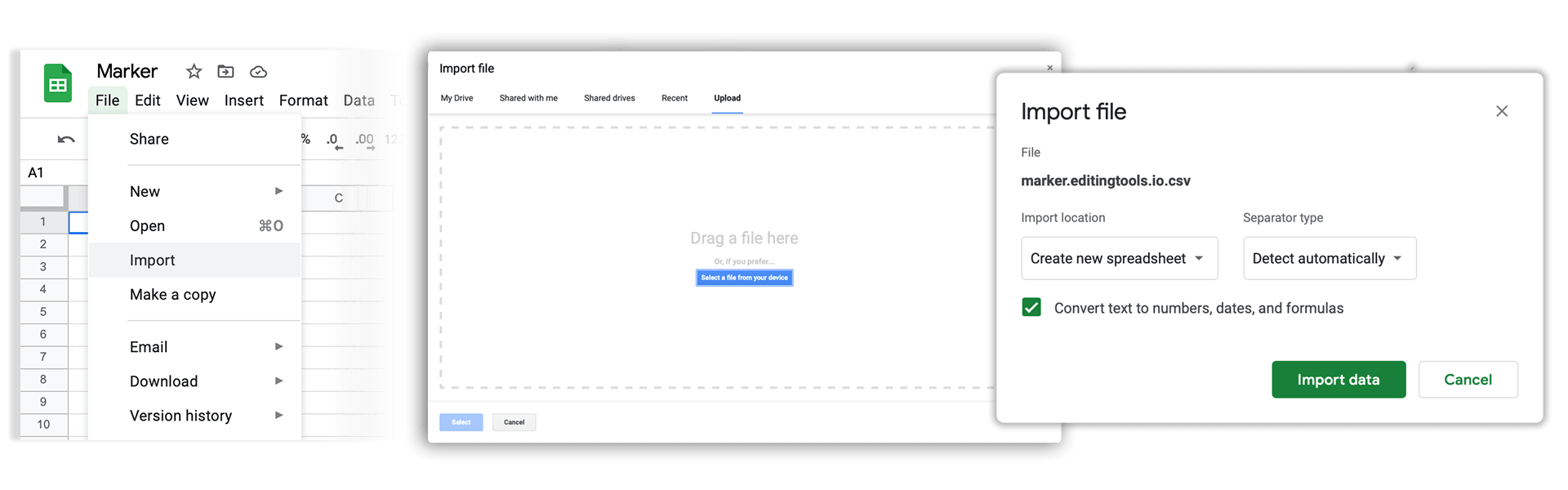
3. Import the CSV file into Google Sheets
Open Google Sheets and go to "File -> Import". Upload the generated CSV file and press "Import Data" to generate the Sheet with all markers.
🚀 Готово
На этом всё! Если туториал оказался полезным, поделись им, чтобы поддержать нас. Если у тебя есть предложения, как улучшить рабочий процесс, дай нам знать!