1. Use the "Конвертер маркеров" to convert a CSV file into a CSV file
Open the free Конвертер маркеров, select "CSV" and set "convert" to "CSV for Google Sheets". Generate and download the file. Если возникли проблемы с конвертацией файла, обратись в бесплатную службу поддержки.
Ensure that the CSV file contains columns labelled "Timecode In", "Name" and "Comment". Otherwise, it will not work. You can also add columns for 'Colour' and 'Timecode Out'.
2. Import the CSV file into Google Sheets
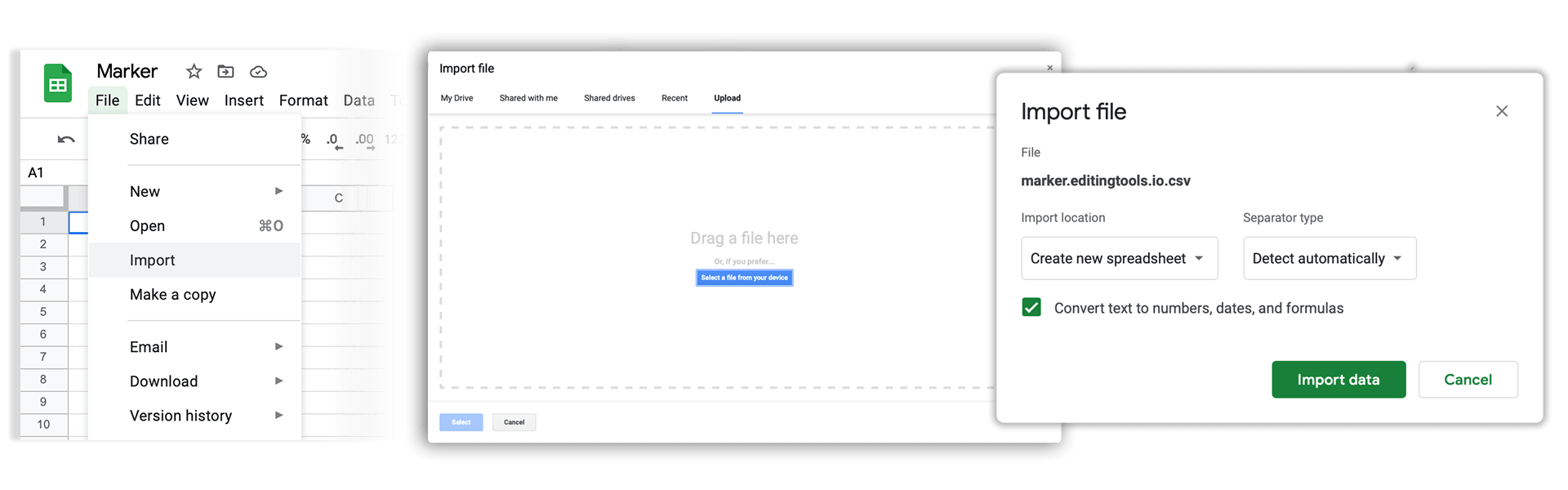
Open Google Sheets and go to "File -> Import". Upload the generated CSV file and press "Import Data" to generate the Sheet with all markers.
🚀 Готово
На этом всё! Если туториал оказался полезным, поделись им, чтобы поддержать нас. Если у тебя есть предложения, как улучшить рабочий процесс, дай нам знать!