1. Export a TXT marker file from Avid Media Composer
To export timeline markers, go to: "Tools -> Marker". Right Click on "Export Markers as Text".
2. Use the "Конвертер маркеров" to convert the TXT marker file into a CSV file
Open the free Конвертер маркеров, select "Avid Media Composer > Marker Text (.txt)" and set "convert" to "CSV for Google Sheets". Generate and download the file. Если возникли проблемы с конвертацией файла, обратись в бесплатную службу поддержки.
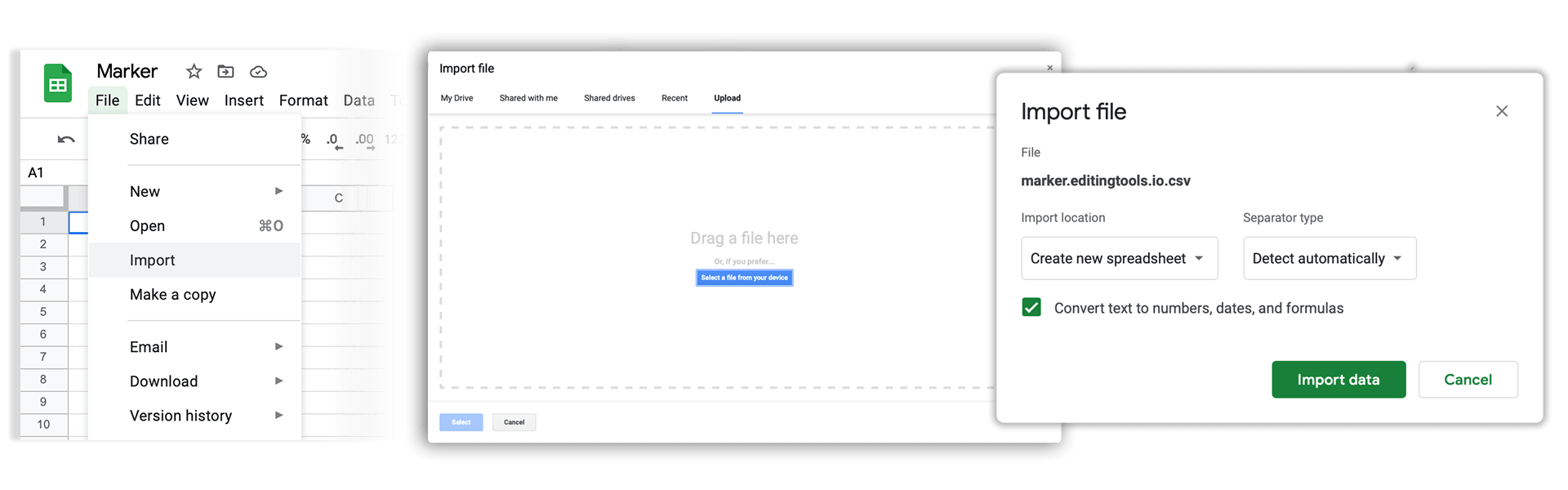
3. Import the CSV file into Google Sheets
Open Google Sheets and go to "File -> Import". Upload the generated CSV file and press "Import Data" to generate the Sheet with all markers.
🚀 Готово
На этом всё! Если туториал оказался полезным, поделись им, чтобы поддержать нас. Если у тебя есть предложения, как улучшить рабочий процесс, дай нам знать!